
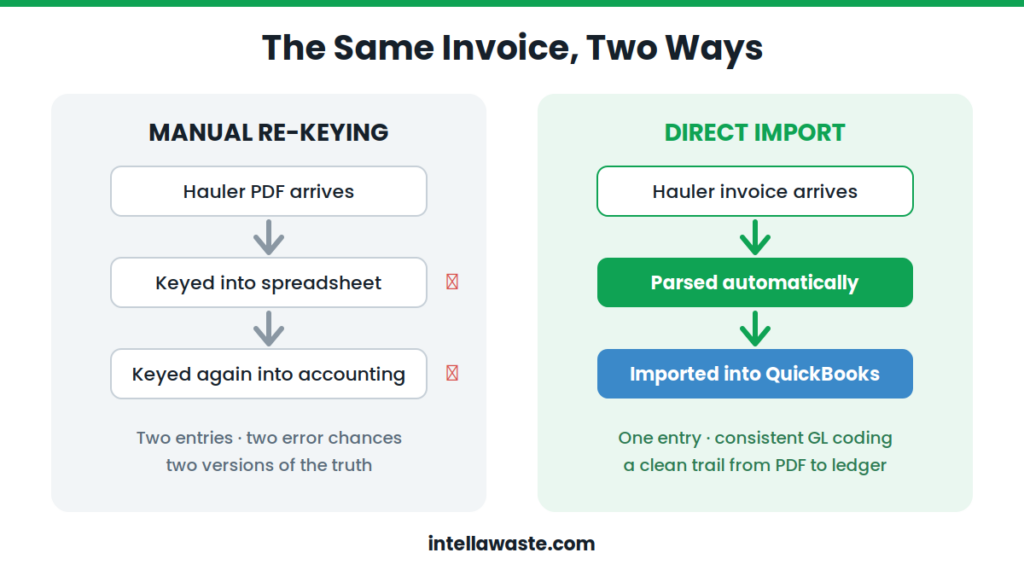
There is a quiet tragedy playing out in waste operations across the country: the same invoice gets typed twice. Once, when someone keys it from the hauler’s PDF into a tracking spreadsheet. Again, when someone enters it into the accounting system. Two chances for a typo. Two versions of the truth. And no reliable trail connecting either version back to the document the hauler actually sent.
Nobody designed this workflow. It accreted — one hauler, one spreadsheet, one accounting entry at a time — until finance teams inherited a process where waste spend is the murkiest line in the general ledger. This article is about the fix: waste management accounting integration, where parsed hauler invoice data flows directly into QuickBooks and other accounting platforms, and no number is ever typed twice.
The Double-Entry Problem Nobody Assigned
Ask a controller where their waste numbers come from and the answer usually involves a chain of custody no auditor would love. A hauler publishes an invoice to a portal. An operations person downloads it and keys the total — sometimes the line items, often not — into a spreadsheet. Weeks later, an AP clerk enters the same invoice into the accounting system, coding it to whatever GL account seems closest.
Every link in that chain adds lag, and every keystroke adds risk. The spreadsheet and the books drift apart. Month-end reconciliation becomes arbitration between the two — and when the numbers disagree, someone has to go find the original PDF to break the tie, assuming anyone still knows which portal it lives in.
The symptoms show up downstream, where finance feels them: GL coding that varies depending on who entered the invoice, waste costs that can’t be reported cleanly by site or category, and a close that stalls while people hunt documents. We covered the operational side of this in our article on manual waste invoice processing and month-end. This is the accounting side of the same disease.
What Does Waste Management Accounting Integration Actually Do?
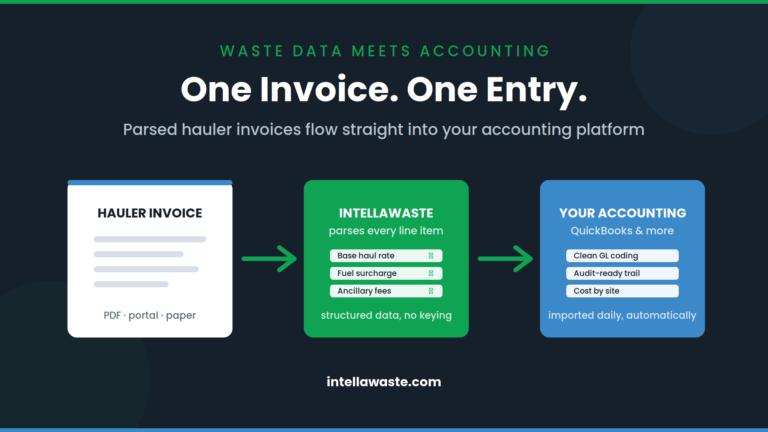
The direct answer: waste management accounting integration takes hauler invoices that have already been collected and parsed into structured line-item data and imports them directly into your accounting platform — QuickBooks or otherwise — with no manual re-entry. One document, one entry, one consistent record from the hauler’s original invoice to the general ledger.
With IntellaWaste, this is built into the platform’s foundation rather than bolted on. Invoices are retrieved and parsed automatically — clients import over 10,000 waste invoices a day through the system — and the resulting structured data is batch-uploaded daily into the accounting platform of your choosing. The real-time hauler invoice import adapts to your accounting software; the keying step simply stops existing.
Clean GL Coding, Every Time
When humans code invoices by hand, coding is a matter of opinion. One clerk books fuel surcharges into the haul-cost account; another breaks them out; a third invents a category during a busy week and it lives forever. None of them is wrong, exactly. But the chart of accounts ends up telling three different stories about the same spend, and any report built on it inherits the inconsistency.
Structured data ends the debate. When every invoice arrives as parsed line items — base rate, fuel surcharge, environmental fee, extra pickup, tonnage — the mapping to GL accounts is defined once and applied identically forever. The invoice from your messiest regional hauler codes exactly like the invoice from your cleanest national one. Consistency stops depending on who was at the keyboard.
A Faster Close, Measured in Days
Manual accounting entry is always the last domino. Invoices have to be collected before they can be keyed, keyed before they can be checked, checked before AP can post them — so the accounting record trails the hauler’s billing by weeks, and the close waits on all of it.
Direct import collapses the sequence. Invoice data lands in the accounting system on a daily rhythm, all month long, instead of arriving as a month-end avalanche. By the time the period closes, the entries are already there — posted, coded, and matched to source documents. The close stops being a data-entry sprint and becomes what it was supposed to be: a review.
For waste brokers, the same integration carries the revenue side too. Client invoices generated from contract terms flow into the books alongside the hauler costs they’re built on, which means margin by account is a report, not a research project.
An Audit Trail That Starts at the Source Document
Here is the question that makes manual workflows sweat: prove this number. An auditor, a CFO, or a client picks a waste cost off a report and asks where it came from. In a re-keyed world, the answer runs through a spreadsheet, a memory, and a PDF someone hopes they can find.
Integrated workflows answer differently. Every figure in the ledger traces back through structured line items to the hauler’s original invoice, stored and viewable in the platform indefinitely. And because the data was audited against contract terms on arrival — before it ever reached the books — what lands in your GL isn’t just accurate to the invoice. It’s been checked against what the invoice was allowed to say. Overcharges get flagged as cases to resolve instead of costs to book.
Real Cost Reporting by Site and Category
The payoff for all of this discipline is that waste spend finally becomes analyzable. When invoice data enters accounting as one murky lump, the P&L can tell you what waste cost in total — and nothing else. When it enters as consistently coded line items tied to locations, the questions that matter become answerable in minutes: Which sites run above the portfolio average, and why? What did fuel surcharges actually total last quarter? What’s the trend at the location whose rates keep creeping?
That’s the difference between reporting on waste spend and merely recording it. Finance gets numbers it can defend, operations gets outliers it can act on, and budget season starts from data instead of last year plus a guess.
Frequently Asked Questions
Does IntellaWaste integrate with QuickBooks?
Yes. Parsed hauler invoice data imports directly into QuickBooks, so nothing is re-keyed between the platform and the books. IntellaWaste adapts to your accounting software, with daily batch uploads into the platform of your choosing.
What data actually transfers into the accounting system?
Line-item invoice data — haul charges, surcharges, fees, and quantities — parsed from each hauler’s original document and mapped to consistent categories, along with the association to the correct customer location.
How does integration help at month-end close?
Because invoice data imports on a daily schedule rather than in a month-end batch of manual entries, accounting records stay current all month. The close shifts from entering and reconciling data to reviewing it — and finishes days earlier.
Is this only for waste brokers?
No. Brokers and consultants feel the pain most acutely because their client billing depends on hauler data, but multi-location businesses managing their own waste spend get the same benefits: consistent GL coding, faster closes, and cost reporting by site.
Stop Typing the Same Invoice Twice
Accounting integration is the least glamorous thing we build — and it may be the feature controllers thank us for most. If your waste numbers still travel from PDF to spreadsheet to ledger by hand, it’s worth seeing what one clean pipeline looks like on your own hauler mix: book a demo and ask us to walk through the QuickBooks import first. IntellaWaste provides waste management software solutions for businesses across the United States.