
A store closes on a Friday. The lease is returned, the keys are handed back, and the location drops out of the company’s operating reports. Three months later, the hauler is still billing for it.
This happens because closing a site is a project with an owner, and ending its waste service usually is not. Real estate handles the lease. Operations handles staff and inventory. Accounts payable keeps paying the invoices that arrive. The hauler keeps servicing the account and sending the bill until someone ends the agreement the way the contract requires.
The way to stop waste billing after site closure is a defined offboarding workflow: operations notice, contract review, cancellation, equipment removal, final invoice, and a stretch of monitoring after the site is gone. Below is that workflow step by step, the places it usually breaks, and the records worth keeping when it does.
Why Waste Billing Outlives the Location
Most waste agreements are tied to a service address and a hauler account number. They are not tied to whether the business is still operating there. Service continues until the term ends or the customer terminates under the contract’s terms. A locked door ends nothing on its own.
Charges usually keep running for one of a handful of reasons. The hauler was never told, or was told informally by a site manager talking to a driver. The cancellation request went out, but nobody confirmed it was processed. The container is still on the property, so the account still looks active. The contract term runs past the closure date, and no one checked what ending it early involves. Or the invoices are on autopay, where a bill for a closed site looks exactly like every other bill.
Our waste invoice audit checklist treats billing at closed sites as something to catch on the invoice. This article works upstream of that, so the invoice never shows up in the first place.
Closed, Sold, and Paused Are Three Different Exits
The workflow is the same in each case. The goal at the end of it is not.
| Situation | What usually needs to happen | Main risk |
|---|---|---|
| Closed permanently | Terminate service under the contract, remove all equipment, reconcile the final invoice | Billing continues after the last operating day, or early-termination terms surface only when the bill arrives |
| Sold or transferred | Set a cutover date; transfer, assign, or terminate the agreement as the contract allows; the buyer sets up its own service | The seller pays for the buyer’s service after the sale date, or the transfer is never formally completed |
| Paused or seasonal | Suspend or reduce service as the contract allows and confirm how service restarts | Full rates during the pause, or a reduced schedule that never returns to normal when the site reopens |
Partial changes follow the same steps at smaller scale. A site that drops its cardboard stream or loses a compactor has a service to end, even though the location stays open.
The contract decides which path is available. Some agreements allow termination when a business stops operating at the service address. Others treat any early exit the same way. Some allow assignment to a buyer; others require the hauler’s consent. Read the clause before you plan around it, and bring in counsel when the language or the dollars call for it.
The 7-Step Workflow to Stop Waste Billing After Site Closure
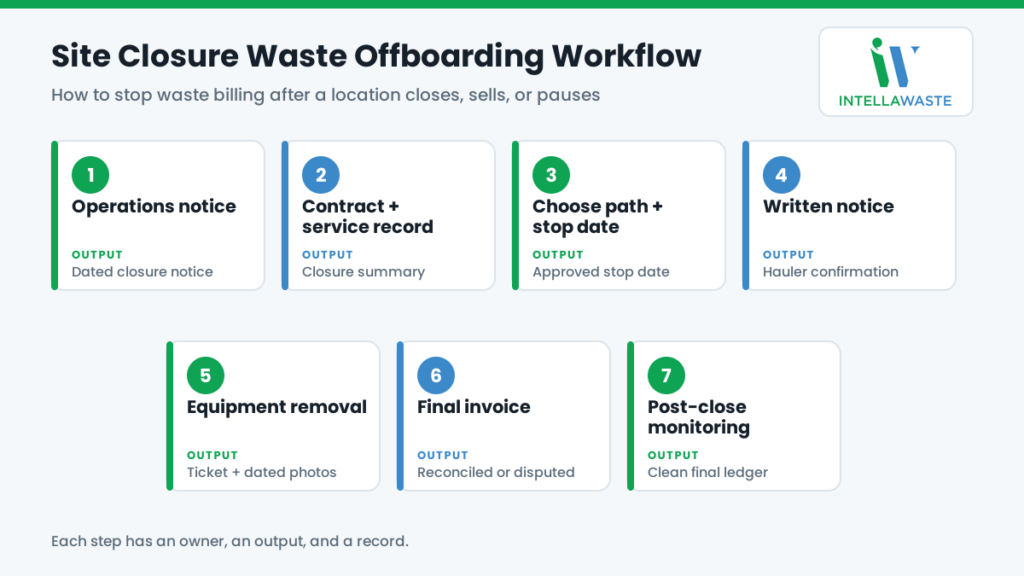
Each step has an owner, an output, and a record. When one of those is missing, the step tends to get skipped.
1. Start With the Operations Notice
Closures rarely surprise operations, real estate, or leadership. They often surprise whoever manages waste. The first control is a trigger: any decision to close, sell, pause, or downsize a location generates a notice to the waste owner with the location ID, the planned last operating day, the type of change, and a contact on site.
Brokers depend on the client for this trigger. Build it into the relationship. Ask clients to report closures when they are decided, not after the lease ends.
Output: a dated closure notice attached to the location record.
2. Pull the Contract and the Current Service Record
Before anyone calls the hauler, find out what the agreement says. Pull the current contract, addendums, and rate notices for the location. The clauses that matter most at closure are the term and expiration date, the termination and notice requirements (who must receive notice, in what form, and how far ahead), any early-termination or liquidated damages provision, assignment terms, suspension or reduced-service terms, and who owns and removes the equipment.
Then pull the service record: every waste stream, container type, size, count, and pickup frequency at the site. A location with trash, cardboard, and a compactor may have three line items, three agreements, or three different vendors. Each one has to end.
We covered auto-renewal windows and termination penalties in hidden costs in waste management contracts. At closure, the issue is timing. Knowing the terms before the last operating day leaves room to plan instead of react.
Output: a one-page closure summary of what is in place, what the contract requires, and the earliest date service can end.
3. Choose the Path and Set the Stop Date
With the terms in hand, decide whether to terminate, transfer, suspend, or reduce. Set a service stop date and a target date for equipment removal.
Match the stop date to the last day anyone generates waste on site. Clean-out and teardown often produce more waste than a normal week. End service too early and you pay for extra pickups or a roll-off. Plan the final pickup deliberately.
If ending the agreement carries a fee, weigh it here against the remaining contract value. It should be a business decision made on purpose, not a surprise discovered on a future invoice.
Output: an approved path and a stop date.
4. Send Written Notice and Get Confirmation
Send the cancellation, transfer, or suspension notice in the form the contract specifies, to the address it specifies, inside any required notice window. A phone call to the local office or a word with the driver does not count. Reference the account number, service address, each service being ended, the effective date, and the request to remove equipment.
Then get confirmation. Ask for a written acknowledgment from the hauler that names the account and the effective date. If nothing arrives within a week, follow up. A cancellation that was never confirmed is one of the most common reasons closed sites keep generating invoices.
Output: a copy of the notice, proof of delivery, and the hauler’s written confirmation.
5. Schedule and Document Equipment Removal
As long as a container sits on the property, the account looks active, and service can continue by default. Schedule removal of every hauler-owned container and compactor. Note who owns each piece of equipment, because customer-owned or separately leased compactors follow a different path than hauler-owned dumpsters.
Document the removal: the date, the hauler’s removal ticket or work order, and dated photos of the empty enclosure. For a sold site, document which equipment stays and whose account it belongs to after the cutover date.
Output: removal confirmation and dated photos filed with the location.
6. Reconcile the Final Invoice
The final bill is where closure errors collect. Check it against the stop date and the contract:
- Recurring charges end on the stop date, prorated if the contract provides for it.
- No pickups or service events are billed after the stop date.
- Any removal fee is allowed by the contract and billed at the contracted rate.
- Early-termination charges are calculated exactly as the contract specifies.
- No new fees appear without a contractual basis.
- Service billed in advance for a period after the stop date is credited back.
If something is wrong, hold payment on the discrepant amount and dispute it with the documentation from steps 4 and 5. Paying a discrepant invoice can make a later credit harder to recover. Our guide to waste hauler overbilling explains how price discrepancies are documented and resolved.
Output: a reconciled final invoice, approved or in dispute.
7. Monitor After the Close
Mark the location closed. Do not delete it. For at least two or three billing cycles after the final invoice, watch for anything that references the account number, service address, or location ID. Typical stragglers include late-posted charges, trailing fees, an account a billing system quietly reactivated, and a promised credit that never appeared.
Once the account is quiet and any credit has posted, set the location to inactive with an effective date. It drops out of active spend reporting and keeps its full history.
Output: a closed location with a dated history and a clean final ledger.
Where the Offboarding Process Usually Breaks
The notice never leaves the building. Real estate and operations know about the closure for months. The person who manages waste finds out from the first post-closure invoice.
Only the main hauler is notified. The recycling vendor, the grease service, or the document-shredding company keeps billing because nobody listed every service at the site.
Notice goes to the wrong place. An email to a sales rep or a note to the local dispatcher is not the written notice the contract requires.
Cancelled in conversation, active in billing. The hauler’s representative agreed on the phone. The billing system never heard about it.
The container stays behind. An empty dumpster in a closed lot keeps an account alive.
No cutover on a sold site. The buyer uses the service, and the seller pays for it because nobody set a transfer date.
The closed site is deleted from the location list. When a late invoice arrives, it has no record to match against. It gets paid, or coded to a general account where nobody looks.
Paused service never resumes correctly. A seasonal site reopens on its reduced schedule, overflows, and racks up extra pickup charges until someone notices.
Evidence to Retain for Every Closed, Sold, or Paused Site
If a charge appears after the stop date, the dispute is only as strong as the records behind it. Keep these with the location record, not scattered across email threads.
| Record | Why it matters |
|---|---|
| Internal closure notice with the last operating day | Establishes when service should have ended |
| Contract, addendums, and termination clause | Defines notice requirements and which charges are permitted |
| Written notice and proof of delivery | Shows notice was given as required and on time |
| Hauler confirmation with the effective date | The most direct evidence for disputing charges after that date |
| Removal ticket and dated photos of the empty enclosure | Shows nothing remained on site to service |
| Final invoice with reconciliation notes | Shows what was checked and what was approved |
| Dispute correspondence and credit confirmation | Closes the loop on any recovered charges |
| Sale or transfer documents with the cutover date | Separates the seller’s obligations from the buyer’s |
The principle is the same one behind waste service verification: what was scheduled, what happened, what is documented, and what was billed are four different records. At closure, all four should point to the same end date.
For Waste Brokers: Two Invoices Have to Stop
A broker sits between the hauler and the client, so a client closure ends two billing relationships, and they need to end on the same date. If the hauler keeps billing after the broker stops invoicing the client, the broker absorbs the cost. If the broker keeps invoicing the client, the client finds it, usually at the worst possible moment in the relationship.
Treat every client closure as one event that updates both sides: the hauler termination workflow above, and the client’s billing. A closure also changes the client’s footprint, which can be a good moment to review service and pricing at the remaining sites. Our waste RFP playbook covers when a portfolio change justifies going back to market.
Where IntellaWaste Fits
IntellaWaste does not mail your cancellation letter or haul away a container. It keeps the records this workflow depends on in one place, so each step starts with a lookup instead of a search.
Hauler contract tracking stores each location’s contract terms, so step 2 begins with the agreement already on file. Service level tracking records the number of containers, container size, type of service, and pickup frequency at every location, which is the inventory of everything that has to end.
Invoices are uploaded and parsed automatically and assigned to the correct location using unique location and customer identification codes, and they stay available for viewing and tracking indefinitely. A trailing invoice for a closed site lands on that site’s record and its history, not in an anonymous accounts payable batch. Invoice auditing compares billed charges with contract terms, and hauler overbilling case management tracks each price discrepancy through to resolution.
For brokers and consultants, IntellaWaste’s automatic invoicing bills clients based on their contract terms, so keeping a closed location’s status and terms current keeps the client invoice accurate too. For multi-site teams, a portfolio-wide view makes a closed location that is still costing money stand out against the rest.
Frequently Asked Questions
How do I stop waste billing after a site closure?
Review the contract’s termination terms, send written notice in the required form and timeframe, get the hauler’s written confirmation of the effective date, remove all equipment, reconcile the final invoice against the stop date, and watch for trailing charges for at least two or three billing cycles.
Can a hauler keep billing after a location closes?
It depends on the contract. If the term is still running and the agreement has no termination right tied to closure, the hauler may be entitled to continued charges or an early-termination fee as written. If you terminated under the contract’s terms, charges after the confirmed effective date should be disputed with your notice and confirmation as evidence.
What happens to the waste contract when a location is sold?
That depends on the assignment clause. Some contracts can be assigned to the buyer, some require the hauler’s consent, and some must be terminated so the buyer can set up new service. Whatever the path, set a clear cutover date and document which party is responsible for service and equipment from that day forward.
How long should we monitor a closed location for charges?
Plan on at least two to three billing cycles after the final invoice, and longer if a dispute or a promised credit is still open. Keep the location in your system as closed rather than deleting it, so any late invoice has a record to match against.
Make Every Closure a Clean Exit
Every location you close, sell, or pause comes with a contract, a container, and a vendor account that has to end on purpose. If your team manages waste across many sites or a full client book, the difference between a clean exit and months of trailing charges is a repeatable workflow and records that live in one place.
Book an IntellaWaste demo to see how contract tracking, service-level records, and invoice auditing keep closed locations from turning into open-ended charges.
IntellaWaste provides waste management software solutions for businesses across the United States.