

The quarter is over. Within days, finance will lock the period, and whatever the waste line says becomes the number everyone reports, forecasts from, and defends.
For most organizations, that number is simply the sum of the hauler invoices that happened to arrive and get paid. Some invoices are still sitting in a portal. Some charges are in dispute. A credit promised two months ago may never have posted. A location that closed mid-quarter may still be billing.
A quarterly waste spend review catches those problems while the period is still open and still fixable. It does not require a new audit program. It requires seven reports, pulled in a sensible order, with a specific action attached to each one.
This guide is written for controllers, accounts payable leads, and operations managers at multi-site businesses, and for waste brokers and consultants who close out hundreds of client accounts at once.
Why a Quarterly Waste Spend Review Is Different From Monthly Invoice Checks
A monthly invoice review asks one question: is this invoice right? Our waste invoice audit checklist covers that line-by-line work.
The quarter-end review asks a different question: is this period right? An invoice can be perfectly accurate and the quarter can still be wrong. Expense is understated when invoices never arrived. Disputed charges get paid by default when nobody decides what to do with them before the payment run. Credits land against the wrong location or the wrong month. Contract deadlines that fall early next quarter need action now, not after the next close.
The seven reports below are built around those period-level risks.
Report 1: Spend Trend by Location, Hauler, and Charge Type
What to pull: Total waste spend for the quarter compared with the prior two quarters and the same quarter last year. Break it out by location, by hauler, and by charge type: recurring service, percentage-based charges such as fuel or environmental fees, and one-time services.
What it tells you: Whether the waste line moved, and where. Hauler contracts typically define the price increases allowed within specific timeframes, along with the percentage charges and one-time services the hauler may bill. A trend broken out by charge type shows which of those categories is driving the change.
The action: Give every material variance a label before close. Contract-permitted increase. Service change. One-time event. Unexplained. The first three are explanations. The fourth is a to-do list, and every item on it feeds Report 3 or Report 5 before the period locks.
Report 2: Missing Invoices
What to pull: Every active location, by month, compared with the hauler invoices actually received for that month. Any location-month with no invoice is a gap.
What it tells you: How complete the quarter really is. Invoices go missing for ordinary reasons. A hauler posts late. Nobody checked a particular portal. A paper invoice is sitting in a mailroom at the site.
For waste brokers and consultants, a missing invoice costs more than an incomplete expense line. As Tammy Torres, Office Manager at Global Trash Solutions, explains in her testimonial on the IntellaWaste site, a broker that does not have the hauler invoice cannot invoice its own customer. A missing hauler invoice is also unbilled revenue.
The action: Chase every gap now. For anything that will not arrive before close, work with your accounting team to accrue an estimate based on the contracted rate, so the expense lands in the quarter where the service happened. Flag each accrual so it is reversed against the real invoice when it shows up.
This report gets much shorter when invoices are collected automatically. With IntellaWaste automatic invoice uploads and parsing, each imported invoice is assigned to the appropriate customer location. Paper invoices can be scanned in a batch into a single PDF and uploaded, and the platform filters, sorts, parses, and assigns them to the correct location. Gaps become visible instead of hiding in inboxes.
Report 3: Open Price Discrepancies
What to pull: Every unresolved price discrepancy (PD): the location, hauler, invoice, contracted amount, billed amount, the difference, how long it has been open, and its current status.
What it tells you: How much money is in dispute at quarter-end, and how old those disputes are. Age matters. IntellaWaste’s product documentation makes the point directly: once a location is found to be overbilled beyond its contract terms, the issue needs to be addressed immediately. Paying the discrepant invoice risks overpaying and makes it harder to receive credit on a future invoice. In some cases, a hauler will treat the payment as acceptance and push the account onto a new pricing model.
The action: Before the quarter-end payment run, make a decision on every open PD according to your contract terms and payment policy. Resolve it, hold the disputed amount, or escalate it. Do not let an open discrepancy get paid simply because the payment run arrived first. Anything open for more than one billing cycle should be escalated, because quarter-end is the natural point to push stalled cases. Our guide to waste hauler overbilling explains how price discrepancies form and why they recur.
Report 4: Credits Received vs. Credits Promised
What to pull: Every credit that posted during the quarter, matched to the discrepancy that generated it. Then a second list: every credit a hauler agreed to that has not yet appeared on an invoice.
What it tells you: Whether disputes are actually closing, or just being acknowledged. A hauler’s agreement to issue a credit is not the same as a credit on an invoice.
The delay can be long. Global Environmental Group described its experience before IntellaWaste on the IntellaWaste homepage: the company audited invoices in offline spreadsheets to prove overcharges, and it could take months before a credit arrived from the vendor.
The action: Close the cases where the credit has posted. Chase every promised credit that has not. Confirm each credit was applied to the correct location and period, and, for brokers, reflected correctly on the client’s account. Then check the next invoice for that location. A one-time credit fixes the past. It does not prove the rate was corrected going forward.
Report 5: Site Outliers
What to pull: Locations whose quarterly cost moved out of line with their own history or with comparable sites. Compare like with like: similar facility types, service levels, and markets.
What it tells you: Where to ask questions. An outlier is not automatically a problem. A site may have added service for a good reason. It may also be paying an unauthorized increase, carrying a recurring fee nobody approved, or still billing after a closure. Our article on multi-site waste management software covers how to build fair comparisons across a portfolio.
The action: Send each outlier to the person who owns that site with one specific question, such as “Spend rose sharply this quarter with no change in service on file. Was anything added?” Anything that turns out to be a billing issue moves to Report 3.
Report 6: Upcoming Contract Events
What to pull: Every contract event that falls in the next two quarters: expirations, automatic renewals, notice deadlines, and the dates permitted price increases take effect.
What it tells you: What next quarter will cost, and where you still have leverage. Most hauler contracts run 12 to 60 months, with pricing increases allowed within specific timeframes. If a notice deadline falls early next quarter, it may pass before the next quarterly review ever happens.
The action: Calendar every notice deadline with an owner. Start the bid process for accounts worth competing, using a structured waste management RFP process. Put each permitted increase into the forecast at its actual effective date rather than spreading it across the full year. Our guide to waste management budget planning shows that calculation step by step.
Report 7: Service Changes and Their Billing Status
What to pull: Every service change made during the quarter, with its effective date: containers added or removed, size swaps, frequency changes, temporary service, openings, and closures. Next to each change, show whether the invoices after that date reflect it.
What it tells you: Whether billing caught up with operations. A frequency reduction approved in the first month of the quarter should show up on the second and third invoices. If it does not, the location paid for service it no longer receives.
The action: Any change not reflected on the invoice becomes an open discrepancy in Report 3. Then update the forecast run rate so next quarter is built on the service the location actually has. For a closer look at matching billed charges to what happened at the site, see From Route to Record: How Waste Service Data Becomes a Reliable Invoice.
IntellaWaste service level tracking displays the number of containers, container size, type of service, and pickup frequency for each customer account, which gives this report a current baseline to compare invoices against.
Run the Seven Reports in This Order
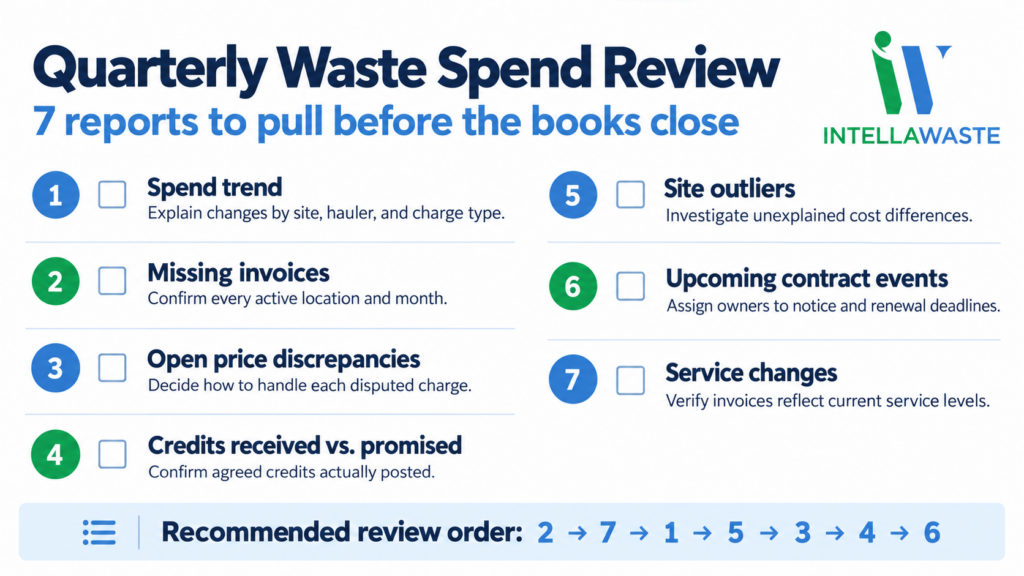
The numbering above follows how finance teams usually think about the quarter. The working order is slightly different. Start with completeness: missing invoices (Report 2) and service changes (Report 7), because every other report is unreliable if invoices are missing or service records are out of date. Next, read the spend trend (Report 1) and site outliers (Report 5) to find what moved. Then work the money still in motion: open discrepancies (Report 3) and credits (Report 4). Finish with contract events (Report 6), the one report that looks forward instead of back.
Run in that order, each report feeds the next, and unexplained items end up in one place: the discrepancy list, with an owner and a decision before close.
Where IntellaWaste Fits in the Quarter-End Close
Pulling these seven reports by hand means reassembling the quarter from portals, PDFs, contract folders, and email threads. That is why many teams skip the review and close on whatever arrived.
IntellaWaste brings the underlying records into one platform. Hauler invoices are uploaded and parsed automatically, with each line item readable alongside the original PDF. Hauler contracts are tracked so invoices can be audited against contract terms. Overbilling is managed as price discrepancy cases. Service levels are tracked for every account, and brokers and consultants get customer contract monitoring for the accounts they manage. Invoice data imports into accounting software in real time, which is covered in more detail in our article on waste management accounting integration.
The platform does not make the accounting decisions for you. Accrual policy, payment holds, and escalation remain finance’s call. What changes is the time it takes to get the facts in front of the people making those decisions.
Pricing is straightforward: $5 per location per month with unlimited invoices, no minimum number of locations, and a choice of 1-month or 12-month contracts.
Frequently Asked Questions
What is a quarterly waste spend review?
A quarterly waste spend review is a check of a full quarter’s waste costs before the accounting period closes. It confirms that every location’s invoices were received, that disputed charges and promised credits are accounted for, that service changes are reflected in billing, and that upcoming contract deadlines have owners.
Does a quarterly review replace monthly invoice auditing?
No. Monthly or per-invoice auditing checks whether individual charges match the contract. The quarterly review checks whether the period as a whole is complete and correct, and it looks ahead to contract events in the next two quarters.
Who should own the quarterly waste spend review?
Finance or accounts payable typically owns the close, but the review needs input from procurement for contract events and from operations or site managers for service changes and outliers. For waste brokers and consultants, the account team usually runs it across the client book.
What should we do with a billing dispute that is still open at quarter-end?
Make a documented decision before the payment run, based on your contract terms and payment policy: resolve it, hold the disputed amount, or escalate it. Paying a discrepant invoice without a decision can make a credit harder to recover and, in some cases, may be treated by the hauler as acceptance of the new price.
Close the Quarter on Numbers You Can Defend
The quarter-end review is where waste spend stops being a total and becomes a set of decisions: what to accrue, what to dispute, what to chase, and what to renegotiate before the window closes. IntellaWaste has recognized over $1,000,000 in overbilling events, and that work starts with having every invoice, contract, and service record in one place when the books close.
Book an IntellaWaste demo to see how your invoices, contracts, discrepancies, and service levels can be ready for review before the next quarter ends.
IntellaWaste provides waste management software solutions for businesses across the United States.