

An invoice audit compares a bill to what should have been billed. A budget estimates what service should cost next year. A report tells leadership where the money went. All three depend on a set of records most teams rarely look at directly: the list of active sites, the hauler account numbers tied to each one, the containers and schedule at each address, the contract terms, the billing periods, and the history of what changed and when.
That layer is master data, and waste data quality is mostly a question of whether it is right. When it isn’t, every workflow built on top of it inherits the error. An audit flags a correct charge because the service profile is six months old. A budget carries a store that closed in March. A report splits one location into two because the hauler changed its account number after a system migration.
This article covers the six master records behind waste audits, budgets, and reports, how bad records show up downstream, and a cleanup checklist your team can run before the next audit cycle, budget season, or client review. It applies whether you manage ten sites in one metro area or several thousand locations across the United States.
What Waste Data Quality Means in Practice
Data quality sounds abstract until you break it into tests. For waste spend, a record is useful when it passes three.
Complete. Every active site has a record, and every record carries the fields an audit or forecast actually needs. A site with an address but no container size can’t be audited against its service level.
Current. The record reflects changes as of the date they took effect, not the date someone got around to entering them. A service reduction logged two months late makes two months of correct invoices look like overbilling.
Consistent. The same site, hauler, and account appear the same way in invoices, contracts, accounting, and reports. “Store 114,” “#114 Tampa,” and “Tampa Westshore” might be one location. Your system should know that without a person remembering it.
A location can pass one test and fail the other two. Most data problems in waste management are not missing data. They are records that were right once and quietly drifted.
The Six Master Records Behind Every Waste Workflow
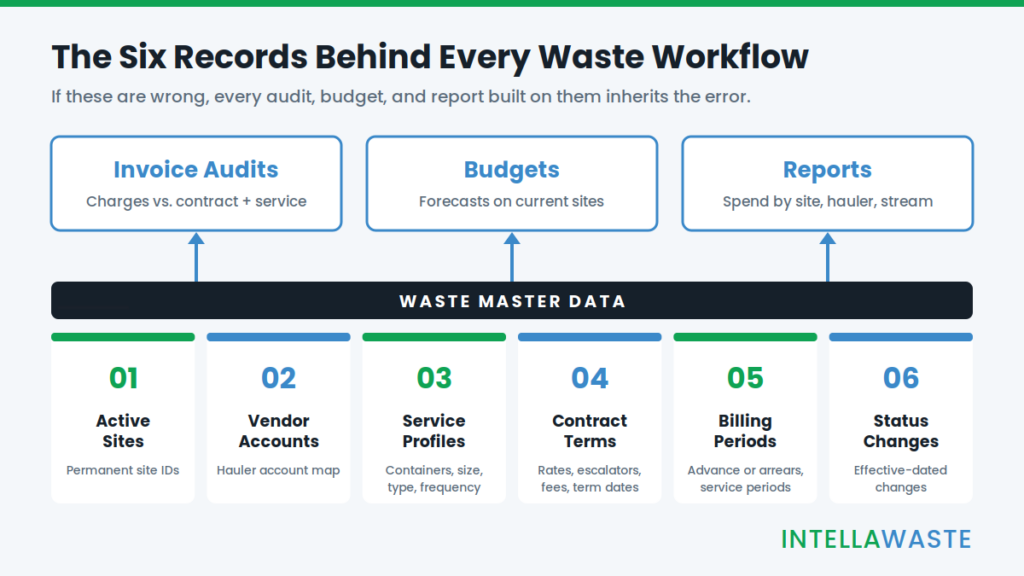
1. Active Sites
The site list is the denominator for everything else. Cost per location, benchmark comparisons, and budget totals are only as accurate as the list of places you are paying to service.
Three problems show up again and again: duplicate records for the same address, closed sites that are still being billed, and new sites that started service before anyone created a record. Give every location a permanent internal site ID that does not depend on how a hauler names it. Hauler names change. Your ID shouldn’t.
2. Vendor Account Numbers
The account map connects an incoming invoice to a location. It is rarely one-to-one. A single site can have separate accounts for trash, recycling, roll-off, and organics. A single account can cover several sites. Haulers also reassign account numbers after acquisitions and billing-system changes.
A national portfolio may work with large national haulers and dozens of regional or independent ones, each with its own account format. Store account numbers as text so leading zeros survive a spreadsheet export, and keep old numbers as aliases when a hauler renumbers. If the account map is wrong, invoices land on the wrong site or don’t land anywhere.
3. Container and Service Profiles
The service profile is the baseline an audit compares against. IntellaWaste’s service level tracking monitors the number of containers, container size, type of service, and frequency of pickup for each location. Those four fields answer the first audit question: what should this site be charged for?
The common failures are formatting failures. One record says “8 yd,” another says “8 cubic yards,” and a third lists a 96-gallon cart without a count. Frequency shows up as “2x,” “Mon/Thu,” and “twice weekly.” Pick one set of values for size, stream, service type, and frequency, and use it everywhere.
4. Contract Terms
Hauler agreements commonly run 12 to 60 months. Over that span, the invoice needs to be checked against the rates, escalation provisions, fee language, and term dates the parties actually signed. If the contract record is missing the escalation cap, no audit can flag an increase above it.
Capture base rates, escalation terms, allowed fees, start and end dates, and the renewal notice window for every agreement and addendum. Hauler contract tracking and invoice auditing only works when those terms are stored as data rather than buried in a PDF. The renewal window also drives bid timing. Missing it can push you into an automatic renewal before a competitive waste RFP is possible.
5. Billing Periods
Some accounts bill in advance, some in arrears. Some bill monthly, others quarterly. A site that starts mid-month gets a prorated invoice. A hauler that fixes an error sends a catch-up charge. Without billing period data, an audit can’t tell a duplicate from a legitimate catch-up, and a report assigns cost to the wrong month.
Record the service-period dates on every invoice separately from the invoice date. That single field makes accruals cleaner and keeps month-over-month trend lines from swinging for no operational reason.
6. Status Changes
Sites open and close. Service goes up for a holiday season and back down in January. A location switches haulers. Each change needs an effective date, a source, and the name of the person who recorded it.
The effective date is the one that matters. If a compactor was pulled on June 1 and the change was entered on July 15, the June invoice should be judged against the new profile. Our article on waste service verification covers how that plays out invoice by invoice. At the master-data level, the rule is simpler: log the change when it happens, dated to when it happened.
How Bad Master Data Shows Up Downstream
Poor waste data quality rarely announces itself. It shows up as audit results nobody trusts, budgets that miss by a wide margin, and reports that need a footnote on every slide.
| Master data problem | Effect on audits | Effect on budgets | Effect on reports |
|---|---|---|---|
| Closed site still marked active | Billing after cancellation goes unflagged | Dead cost carried into next year | Cost per site understated |
| Account mapped to the wrong site | Invoice checked against the wrong contract | Spend assigned to the wrong location | Site benchmarks distorted |
| Outdated service profile | False flags or missed overbilling | Forecast built on old service levels | Diversion figures off |
| Escalation terms not captured | Increases pass unchecked | Rate changes can’t be modeled | Savings claims hard to verify |
| Billing period unknown | Duplicates look legitimate | Monthly phasing is wrong | Trend lines swing without cause |
Every item on a waste invoice audit checklist assumes the underlying records are right. Rate matching needs the contract. Quantity checks need the service profile. Surcharge checks need the billing period. Fix the records and the checklist starts producing findings you can act on.
Waste Data Quality Cleanup Checklist
Run this in order. Sites come first because every other record attaches to one. Start with your highest-spend locations if the full portfolio is too large to finish in one pass.
Sites
- Pull every site from every source: accounting vendor records, hauler invoices and portals, contracts, and your internal facility list. Reconcile them into one list.
- Assign each location a permanent internal site ID.
- Standardize addresses, including city, county, and state, and merge duplicates.
- Confirm open or closed status and the actual dates with operations, not with the hauler.
Vendor Accounts
- Map every hauler account number to one or more site IDs.
- List accounts with no site and sites with no account. Both are exceptions to resolve.
- Store account numbers as text and keep prior numbers as aliases.
- Test the map: take three months of invoices per account and confirm each one lands on the expected site.
Container and Service Profiles
- Record container count, size, material stream, service type, and pickup frequency using one controlled set of values.
- Compare each profile to the most recent invoice. Investigate mismatches before overwriting either one.
- Note on-call and extra-pickup arrangements separately from scheduled service.
Contract Terms
- Link each site and account to its governing contract or addendum.
- Capture base rates, escalation terms and caps, allowed fees, term start and end dates, and the renewal notice window.
- Flag every site being billed with no contract on file.
Billing Periods
- Record billing frequency and whether each account bills in advance or in arrears.
- Capture service-period dates separately from invoice dates.
- Find prorated and catch-up invoices from the past 12 months and tie each one to a status change.
Status Changes and Ownership
- Log every change with its effective date, source, and the person who entered it.
- Name one owner for each record type.
- Set a schedule: exceptions reviewed monthly, a full reconciliation quarterly, and an extra pass before budget season and before any RFP.
Keeping Waste Data Clean After the Cleanup
A one-time cleanup starts decaying the day it ends. Three habits keep it from sliding back.
First, capture changes where they happen. When a facility manager closes a site or cuts a pickup, that change should reach the data owner the same week, not at quarter-end.
Second, validate on intake. Every incoming invoice is a free data-quality check. If it carries an account number that isn’t mapped, a container size that doesn’t match the profile, or a service period that overlaps a prior bill, it becomes an exception before it becomes a payment. IntellaWaste’s automatic invoice upload and parsing reads each line item on the invoice, which is what makes that kind of intake check practical at volume.
Third, make every correction traceable. When a record changes, keep the old value, the new value, and the reason. That history is what lets finance defend a number, and what lets a broker show a client exactly why a charge was disputed through hauler overbilling case management.
Why Waste Data Quality Matters More in Multi-State Portfolios
Scale multiplies every weakness in master data. A company with locations in many states deals with more haulers, more account formats, more contract versions, and more jurisdictions. Taxes and municipal or franchise fees vary by city, county, and state, so an accurate site address is part of checking whether those charges are right.
Brokers and consultants managing clients nationwide face the same issue across several portfolios at once. The records that feed a client-facing report have to hold up when the client asks where a number came from. Multi-site waste management software helps by keeping sites, accounts, and service levels in one structure instead of in separate spreadsheets for each client or region.
Clean master data also shortens the path from invoice to ledger. When the account map and site IDs are reliable, waste management accounting integration can post costs to the right location and category without someone re-keying or re-coding each bill.
Where IntellaWaste Fits
IntellaWaste is built around the records described above. Its waste management software products include service level tracking, hauler contract tracking and invoice auditing, customer contract monitoring for waste brokering and consulting accounts, automatic invoice uploads and parsing, real-time hauler invoice imports into accounting software such as QuickBooks and NetSuite, and price discrepancy case management.
The platform has processed more than 60 million invoices and supports businesses across the United States. Pricing is $5 per location per month with unlimited invoices.
Frequently Asked Questions
What is waste data quality?
Waste data quality is how complete, current, and consistent your waste master data is. That includes active sites, hauler account numbers, container and service profiles, contract terms, billing periods, and status changes. Audits, budgets, and reports all draw on these records.
How often should waste master data be cleaned up?
Review exceptions monthly and run a full reconciliation quarterly. Add an extra pass before budget season and before any competitive bid, since both depend on an accurate site list and current contract terms.
Who should own waste master data?
Assign one owner per record type. Operations usually owns site status and service changes. Procurement or the broker owns contract terms. Accounts payable or finance owns account mapping and billing periods. One person should coordinate the whole set.
Can we start auditing invoices before the cleanup is finished?
Yes. Clean up your highest-spend sites first and audit those invoices while the rest of the portfolio is in progress. Treat findings on uncleaned sites as provisional until their records are confirmed.
Does waste data quality matter more for companies with locations in multiple states?
It does. More locations means more haulers, account formats, contract versions, and local tax and fee rules. Small inconsistencies that are manageable at ten sites become systematic errors at several hundred.
How does waste data quality affect budget accuracy?
A budget built on a site list that includes closed locations, outdated service levels, or missing escalation terms will miss. See our guide to waste management budget planning for how clean records feed next year’s forecast.
Clean Records, Credible Numbers
Audits, budgets, and reports get easier to trust when the records underneath them are right. The cleanup takes focused effort once. Keeping it clean takes a few habits and a system that checks every new invoice against the records you’ve built.
Schedule an IntellaWaste demo to see how service level tracking, contract monitoring, and invoice auditing work from one set of site records.
IntellaWaste provides waste management software solutions for businesses across the United States.